The Property Tool
FeaturesPricingFree toolsBlogContact
LoginStart free trial
  1. Home
  2. /Features
  3. /Owner statements
Feature

Owner statement software for property managers

Statements generated from the same booking and expense records you already track — no side spreadsheet, no manual reconciliation before it goes out.

  • Generated automatically from live booking and expense data
  • Management fees calculated the same way, every property, every period
  • Split ownership handled automatically for co-owned properties
Create accountView pricing
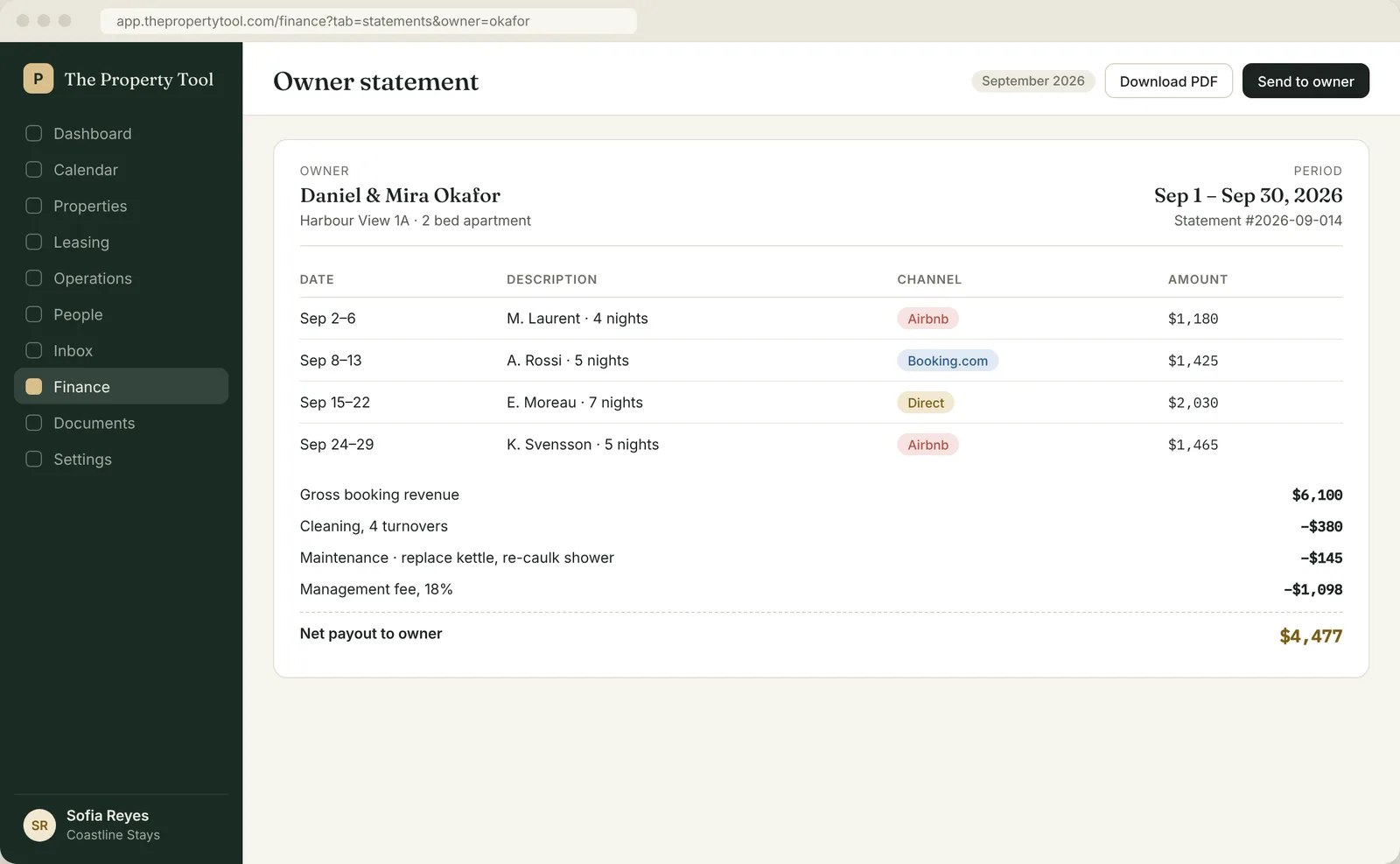
Monthly owner statement for one property showing bookings, cleaning and maintenance costs, the management fee and the net payout to the owner

The same numbers, not a second export

A statement that is assembled separately from the books drifts from them eventually. The Property Tool's owner statements are a report generated from the same ledger your team already works from, so a booking or a maintenance cost only has to be entered once to show up correctly in both places.

A fee calculation an owner can redo themselves

Statements show gross income broken down by booking, each expense with enough description to be self-explanatory, and the management fee calculated explicitly as a percentage of a stated base — so an owner can redo the math with a calculator and land on the same total, instead of taking the final number on faith.

Split ownership, handled natively

Where a property has more than one owner, income, expenses, and fees divide according to each owner's share automatically. No one on your team has to run that math by hand each period.

What a statement has to answer before an owner has to ask

An owner reading a statement is checking one thing: did the property earn what it should have, and does the fee taken out match what was agreed. A statement that lists only totals forces that check into a phone call. One that itemises income by booking and expenses by line lets the owner answer it themselves in under a minute.

That level of detail is not extra work here — it is the natural output of generating the statement from booking and expense records that were already itemised when they were entered. Nothing gets summarised away between the ledger and the page an owner reads.

For a line-by-line walkthrough of what belongs on a statement and how the payout is calculated, see what an owner statement is. If you want to see the layout before signing up, the free owner statement template follows the same structure.

Statements on a schedule, not on a reminder

A statement that goes out "sometime in the first week of the month, usually" trains owners to ask before it arrives, which defeats the point of sending one at all. Setting a fixed period — monthly, or whatever cadence your management agreements specify — means an owner knows when to expect it and stops needing to ask.

Because the underlying data updates continuously, an owner does not have to wait for the scheduled statement to see current numbers either. The built-in owner portal software shows the same figures live, between statements, for anyone who wants to check sooner.

Where the number on the statement actually comes from

Trust in a statement comes from being able to trace a total back to its parts, not from the total itself looking plausible. Every figure on a Property Tool statement traces back to a specific booking, expense, or maintenance record — there is no manually adjusted number sitting between the source data and what the owner reads.

What owners actually want from a monthly statement covers this from the owner's side: the handful of things that turn a statement from a formality into something an owner actually reads and trusts. If you are still producing statements by hand, the free owner statement generator lays one out in the same order.

Statements are half of property accounting, not a substitute for it

A clean owner statement is what an owner sees. Underneath it, the books still need to close correctly for tax season, for the business's own reporting, and for the accountant who did not set any of this up and has to make sense of it regardless. Getting the statement right does not automatically mean the books are right.

Property accounting software covers what has to be true underneath the statement for both to hold up — chart of accounts, reconciliation, and the audit trail an accountant will actually ask for.

Common questions

How often are owner statements generated?+

On whatever schedule you set — most teams use monthly, matching their management agreements. The underlying data is live, so an owner can check current numbers between statements through the owner portal.

Can an owner see how the management fee was calculated?+

Yes. The fee is shown as a stated percentage of a defined base on the statement itself, so an owner can verify it rather than take the total on faith.

Do statements break income down by booking, or only as a total?+

By booking. Because the statement is generated from the same records your team already tracks, itemised detail is the default rather than something a report has to be specially built to show.

What happens on a property with more than one owner?+

Each owner receives their own statement reflecting only their percentage of income, expenses, and fees for that property — see owner splits for how the split is configured.

Can statements be exported for an accountant?+

Yes, in formats built for handing off — see data export for what an accountant can do with them directly.

Is a maintenance cost included on the statement it happened in?+

Yes, provided it was marked complete before the statement period closed. Costs post to the ledger the moment a maintenance task is completed.

Run your properties on one system.

Bookings, owner statements, and maintenance — connected, not stitched together.

Create your account

More features

Feature

Owner portal

Give every owner a login of their own — current statements, property performance, and booking activity, without a phone call to get an update.

Feature

Reports

Portfolio-wide reports built from the same booking, expense, and task data you already track — no second export to reconcile before you can trust a number.

Feature

Automations

Rules that send the right message at the right moment — before check-in, on checkout day, when rent is due or a lease is ending — by email, SMS or WhatsApp, from templates you write once.

Related pages

Free tool

Owner statement generator

Enter a period’s rental income and expenses, set your management fee, and get a clean owner statement you can print, save as a PDF, or download as a spreadsheet. Nothing is uploaded or stored.

Free template

Long-term rental owner statement

A free monthly owner statement template for long-term rentals: rent collected per unit, the management fee, repairs and bills paid, the reserve balance, and the distribution to the owner.

Free template

Vacation rental owner statement

A free owner statement template built for short-term rentals: one line per booking with platform fees shown, the management fee, itemised expenses, and the payout. Download it for Excel or Word, or print it.

Product

  • Features
  • Pricing
  • Landlord software
  • Add-ons
  • Owner portal
  • Booking calendar
  • Maintenance
  • Owner statements
  • Rent collection
  • Messaging
  • Reports
  • Tenant management
  • Tasks
  • Owner splits
  • Data export
  • Multi-currency
  • Lease tracking
  • Direct booking website
  • Channel manager
  • Automations
  • Cleaning scheduling
  • E-signatures
  • Pricing rules

Solutions

  • Vacation rentals
  • Short-term rentals
  • Management companies
  • Single-family rentals
  • Apartments
  • Airbnb co-hosting
  • Mid-term rentals
  • Investors
  • Property accounting
  • Small portfolios
  • Syndic & HOA
  • Rental pools

Resources

  • Free tools
  • Owner statement generator
  • Management fee calculator
  • Airbnb host fee calculator
  • Co-host fee calculator
  • Rental yield calculator
  • California rent increase calculator
  • Rental property ROI calculator
  • Prorated rent calculator
  • Rental property depreciation calculator
  • Section 8 rent calculator
  • Cap rate calculator
  • Tourist tax calculator
  • Rental pool distribution calculator
  • Short-term vs long-term rental calculator
  • Rent increase calculator
  • STR break-even calculator
  • DSCR calculator
  • Rent notice periods by state (data)
  • Short-term rental rules by city (data)
  • Free templates
  • Vacation rental owner statement
  • Long-term rental owner statement
  • Airbnb co-host agreement
  • Vacation rental management agreement
  • Glossary
  • Landlord-Tenant Law
  • Buying Guide
  • Vacation Rental Software
  • Short-Term Rental Regulations
  • Tenant Operations
  • Rent Collection
  • Growth

Compare

  • All comparisons
  • Buildium
  • AppFolio
  • Guesty
  • Hostaway
  • TurboTenant
  • DoorLoop
  • Hostfully
  • Rentec Direct
  • OwnerRez
  • Yardi Breeze
  • Lodgify
  • Hospitable
  • Rentvine
  • Propertyware
  • Avail
  • RentRedi
  • Innago
  • Hemlane
  • Baselane
  • Smoobu
  • TenantCloud
  • Landlord Studio
  • Rent Manager
  • iGMS
  • Uplisting
  • Stessa
  • Zillow Rental Manager
  • Beds24
  • Streamline
  • Tokeet
  • Rentals United
  • Entrata
  • CINC Systems

Company

  • Home
  • About
  • Blog
  • Contact
  • Privacy
  • Terms
  • Stockflow - Inventory Management
Popular guides1099 season for property managers: what software should automateBest short-term rental software for small portfolios (2026)Dynamic pricing for short-term rentals: how the tools actually workVirginia rental fee disclosure law: what must be on the first page of the leaseHow to start a property management companyLease renewal reminders: building a system so nothing lapsesParis short-term rental rules (2026): the 90-night cap, registration and second homesProperty management software pricing: what tools actually cost in 2026Rental property accounting checklist: what your books need to get rightSecurity deposit management: what landlords get wrongSelf-managing vs. hiring a property manager: doing the mathTenant screening: what checks actually predict a good tenant
LanguagesEnglishNederlandsFrançaisDeutschEspañol
The Property Tool

© 2026 The Property Tool. All rights reserved.